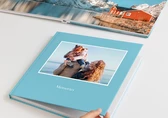

Saal AI is built directly into our design software, whether you create on your smartphone, tablet or computer. Available across all Saal Digital photo products, these tools help you improve images, edit details, generate custom visuals and add personalised touches — so creating something beautiful feels easier from start to finish.

Watch the video to get a quick look at how Saal AI helps you design smarter, faster, and with more creative freedom.

Our AI Editor assists you in making quick and precise modifications to your images without interrupting the design process. To utilize it, simply click on any image within your project and select AI Retouch. You may then choose from popular prompts or describe your requirements in your own words.
This is an accessible tool suitable for both beginners and advanced projects, and it can assist you with tasks such as:
We’ve created a simple YouTube tutorial that will show you the full potential of this tool.

We already offer a wide range of cliparts for many occasions, from weddings and baby albums to travel and communion. But if you can’t find exactly what you need, you can now create your own directly in the designer. For example, you can now have your personalized cliparts on a coffee table book about your last trip.
Simply open Cliparts, click Create it with AI, and enter your prompt. Your custom clipart will be generated in around 15–20 seconds with a transparent background, ready to resize, move, and place wherever you like on your design.
Want to see how easy it is? Click below to watch our YouTube tutorial.

Our AI Image Generation feature lets you create unique images directly in the designer, simply by entering a prompt. To use it, go to Add element > AI Image and describe what you want — your image will be generated in just a few seconds.
It’s a simple way to add a more personal touch to your design, and can be especially useful for:

Some of our AI-powered tools work in the background to help you achieve the best possible print quality — with no extra effort needed.

At Saal Digital, photography and personal memories are always at the heart of every photo product. AI is not here to replace your images or your creativity: it’s here to help you design with more ease, enhance your photos, and create personalized details that make your product even more special.
Our goal is to help you preserve your memories in beautiful, high-quality photo products. AI is just another helpful tool to support you along the way.


 Our recommendation
Get exclusive discounts and designing tips! By signing up, you acknowledge our Privacy Policy. You can unsubscribe at any moment.







 Change your country